Nine kind bingo predictions for a weekend away
Choose nine kind observations, agree what counts, and know which marks survive a local correction or reset after a shared edit.
Choose observations your group already enjoys noticing. A prediction should still feel comfortable if it happens to you. If a square needs someone to be embarrassed, spend money or take a risk, replace it before play starts.
Tales Ahead uses nine predictions. In a shared group, everyone plays the same list with their own progress. These examples are an editorial starting point, not real events from a trip or a promise that your group will enjoy them.
Tales Ahead is in private testing, with no public App Store download yet, as checked on 20 October 2026. Check current app availability before planning a download.
A board you can adapt
- A plan changes because of the weather.
- Someone spots a detail the rest of the group missed.
- A snack becomes the day's talking point.
- Two people choose the same dessert.
- Someone finds a useful word in the local language.
- A familiar song turns up somewhere unexpected.
- The group takes a longer break than planned.
- A souvenir turns out to be smaller than expected.
- Someone says they would come back.
Read each one aloud before using the list. Replace food squares if they do not suit someone's dietary needs. Keep a language square only if everyone finds it enjoyable. A group that dislikes shopping can swap the souvenir for a surprising sign or a memorable view. You can also use the same idea at home: the board needs shared context, not a travel purchase.
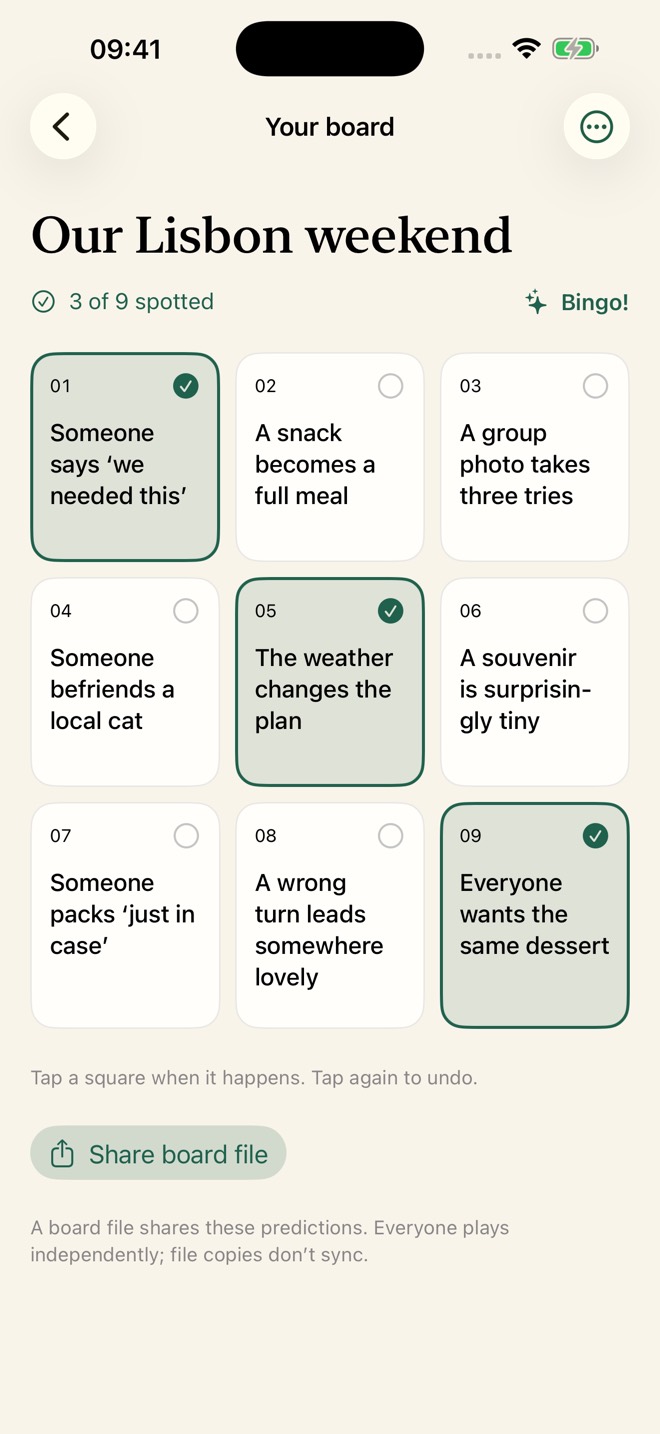
Make each square observable
“A detail the rest of the group missed” is deliberately flexible. Decide together what would count: a sign, a building feature or something on a menu. Keep the judgement easy to discuss. If two people would interpret a square differently, rewrite it before anyone starts marking.
Avoid recording another person's private conversations, health, finances or relationship details as predictions. Name a harmless event rather than choosing a person who must perform it. “Two people choose the same dessert” leaves room for coincidence; “make someone order a dessert” creates pressure.
These are observations, not tasks to complete. Nobody needs to create an event to earn a mark. The group rules prohibit humiliation, pressure and dangerous dares, and require respect for someone who wants to stop.
Agree on the observation, then mark your own board
A shared list does not mean shared checkmarks. Each member marks their own progress, including the host. One person’s tap does not mark the same prediction for everyone else. Support explains individual progress.
In Riley’s fictional weekend group, two people choose the same dessert. The group can agree that this matches the prediction, then each player chooses whether to mark it on their own board. Agree beforehand whether an event anyone notices counts for the group or whether each person wants to witness it. That is your group’s agreement; the app does not verify that an event happened.
Each membership has its own arrangement of the nine predictions, so their positions can differ between players. Compare prediction wording rather than square numbers. A row, column or diagonal makes bingo; the same number of marks does not guarantee the same result. Even the same marked predictions can form a line for one arrangement and not another. The homepage describes the shuffled boards and bingo rule.
Around the board shows each visible member’s marked total and a Bingo! label when their arrangement has a completed line. Those displays reflect the fetched group state and your blocking choices; hidden predictions can affect the displayed total and bingo result. Refresh before comparing current progress. The connectivity guide explains saved views.
Other group members can see your nickname and progress, subject to their blocking choices. Choose a nickname you are comfortable sharing; an optional nickname does not make your marks secret. The privacy page explains what members can see.
The marking, arrangement and Around the board details were checked in the app and API source on 18 October 2026. Riley’s example is fictional; no real-device or production-group play was tested.
Correct a local board or start another round
For a board under On this phone, open Board options, then Edit board. Saving a title-only correction keeps its checkmarks. Changing a prediction’s text clears that prediction’s mark, even for a typo; marks on predictions you leave unchanged stay in place. Cancel leaves the saved board unchanged.
Suppose Riley is playing a separate local board. Correcting the trip title keeps Riley’s progress. Correcting the dessert square’s wording clears that square’s mark if it was marked, while the other unchanged squares keep theirs. This is a fictional example of a correction, rather than a new round.
To replay that local list from zero, choose Clear checkmarks from Board options and confirm Clear checkmarks. The title and nine predictions stay the same. Cancel the confirmation if you want to keep this round’s progress.
These local edit and reset details were checked in the app source on 20 October 2026; no real-device edit was tested. They apply to the board stored on this device. A shared group follows the all-members reset rule below. The connectivity guide explains local boards and independent file copies.
Change a shared board after play starts
Any current member can edit the shared title and nine predictions. Saving clears everyone’s marks, including marks on predictions whose wording has not changed. A title-only correction has the same effect. Support explains the shared editing rule.
Imagine a fictional weekend group: Riley notices a typo in the trip title after people have started marking squares. The typo can wait until the group is ready to restart progress. If a prediction makes someone uncomfortable, stop using that square immediately and agree on a considerate replacement; preserving marks should not take priority over their comfort.
- Agree on the wording and the reset before opening the editor. The host can organise that conversation, but the app does not require host approval for another member’s edit.
- Open Group options, then Edit shared predictions. Review the title and all nine predictions. If you decide to keep the current board, use Cancel in the editor; opening or changing an unsaved draft does not itself clear progress.
- Choose Save only when the group is ready. The confirmation action says “Save and clear everyone’s checkmarks.” A successful save restarts all members’ progress from zero; it does not just clear the square you changed.
If someone else changes the board while your editor is open, the app can reject your older draft and ask you to cancel and reopen Edit. Read their current wording before making a new change. If a save times out, check the refreshed title, predictions and progress before trying again: a missing response does not prove that the server made no change.
The title-only reset, control labels and older-draft handling above come from an owner inspection of the current app and API source on 14 October 2026. They are not a real-device or private-group test. The connectivity guide explains saved copies and uncertain saves.
A short agreement helps: notice the event, mark your own square, and accept that a prediction may never happen. Agreeing to leave this round’s list alone is a group choice, not a feature that locks editing.
Local boards work offline. A shared board can show its last downloaded copy offline, but marking or editing it needs a connection. Choose the right kind of board before heading somewhere with poor reception; the homepage FAQ describes the difference.
Keep the invitation private
No account is needed to join a shared group, but that does not make its content public or anonymous. The service stores shared titles, predictions, nicknames, progress and membership identifiers. A current invitation can let someone join. Share it only with people you intend to invite, and do not post codes in a public board example. The privacy page describes storage, deletion and expiry.
You can read the website's nine-square preview before drafting a list.